Make social easy with NFCtree

Your digital business card on a chip. I took it from a networking problem to the App Store, then redesigned it with one design system across iOS, web and marketing.

★ 5.0

on the App Store

123 → 216

raw values to named tokens

No backend

the chip is the only storage

Client
Self-published
Timeline
2026
Tools
Figma, Figma Motion, Claude Code, SwiftUI, Next.js

Version 1 · June 2026

Everyone wanted to connect. Everyone was bad at it.

At a networking event, people held their phones up to each other, spelling out usernames. Then someone tapped a 3D printed keychain to my phone and a link opened. I went home to build my own. It took several YouTube videos, and it only held one link.

An NFC keychain chip.

Nobody had designed for this person

Someone with a few links who just wants to tap and move on.

Too technical

NFC Tools, NFC.cool

Built for engineers who already know what an NDEF record is.

Too commercial

Popl, Linktree

Your account, your data on their server, and a subscription.

NFCtree

The chip is the storage.

Your links are encoded into one URL on the chip. Someone taps, and your card opens in any browser.

  • No account
  • No server
  • No app on their end
The Home tab in version 1 of NFCtree.
The My Card tab in version 1, with the chip memory meter and profile fields.

Idea to App Store in a month

I vibe coded the first version, with one big decision: the chip is the storage, so there is no account and no server. NFC only exists on a physical iPhone, so Apple review took three rounds.

  1. 1

    Tested on the wrong hardware

    June 3, 2026

    Guideline 2.1 information request. Apple's reviewer used an iPad Air M3 with no NFC hardware, so the core write-and-read flow was physically untestable on their end. Automated checks also flagged Mac and Vision Pro availability.

  2. 2

    Prove it on a real iPhone

    Same day resubmit

    Demo video filmed on a physical iPhone showing the full tap-to-write and tap-to-read flow. Scoped the listing to iPhone only and cleared build warnings for platforms without NFC.

  3. 3

    Approved

    June 2026

    Once the hardware proof, demo video, and device scope aligned everywhere Apple looks, review cleared.

Version 2 · November 2026

Then the iPhone Duo came out.

I thought updating the app would be a layout job. Testing on more screens showed me the bigger problem, so one layout turned into a rebuild of the product, the design system and how I work.

What changed, and what it took.

Information architecture + visual design

From three tabs to one workflow

Version 1 was organized around tabs. Version 2 is organized around the one thing people do: make a card and put it on a chip. My Card became home, setup became three steps, and the brand now comes from the app icon.

Version 1

Version 1: one long screen with a chip meter, profile fields and a tab bar.

Version 2

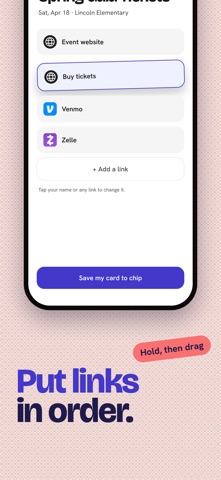
Version 2: My Card shows your name and links with one action, Write to a chip.

Design systems

From raw values to a named system

123

raw v1 values, named by hex code

  • #6B7280
  • #E5E7EB
  • #111827
  • #4338CA
  • #F9FAFB

216

named v2 tokens, light and dark

  • bg/brand
  • text/primary
  • border/default
  • radius/lg
  • space/8

Inclusive design

Accessibility became the floor

Before
Five colors failed contrast, tap targets were too small, and VoiceOver read logos as file names.
After
AA contrast, 44pt tap targets, Dynamic Type at the largest sizes, and VoiceOver on every write result.

AI-assisted product building

From vibe coding to a repeatable process

Figma became the source of truth. Claude Code reads the file through the Figma MCP server, writes the code, and checks each screen in the iOS Simulator. When the code finds a gap, it goes into Figma first.

Designed for web and iOS

The website works at phone, iPad and desktop sizes. The open iPhone Duo gets two panes: your card on one side, the editor on the other.

The NFCtree website on desktop and mobile beside the app on iPhone and the open iPhone Duo.

One launch, one system

The App Store page and four launch videos came from the same Figma file, so every channel looks like the same product.

5.0

on the App Store, from the people using it

  • “Took like 20 seconds to set up, and when I tap it against someone's phone it immediately loads and shows them my LinkedIn page.”

    So nice and loads so fast

  • “No fumbling with QR codes or typing out handles. Super smooth UX and it just works.”

    Such a cool app

  • “No login required, and the data stays private.”

    Extremely useful

What's next

Version 2.0 is in final testing before it goes to Apple. Next I'm studying what happens after the tap: after two people meet, does NFCtree make that relationship more likely to continue?

NFCtree is live

Follow the full building log, then explore NFCtree live and see how one tap can share everything that matters.